Legal
Messaging Terms
What text messages we send, how you consent to them, and how to stop them.
Effective August 8, 2026
These terms apply to text (SMS) messages sent by Pasco Labs LLC. By providing a mobile number and opting in as described below, you agree to receive the messages described here.
The programs we run
1. Appointment messages, sent for a business you booked with
When you book an appointment through a business that uses our scheduling software, we send messages on that business's behalf. These are transactional messages tied to your appointment:
We currently send these messages for Lineage Barbershop of Fairfield, New Jersey (lineagebarbers.com), whose own messaging terms are published at lineagebarbers.com/messaging. Businesses we add later will be listed here.
- A confirmation when the booking is made.
- A reminder before the appointment.
- Notice if the appointment is changed or cancelled.
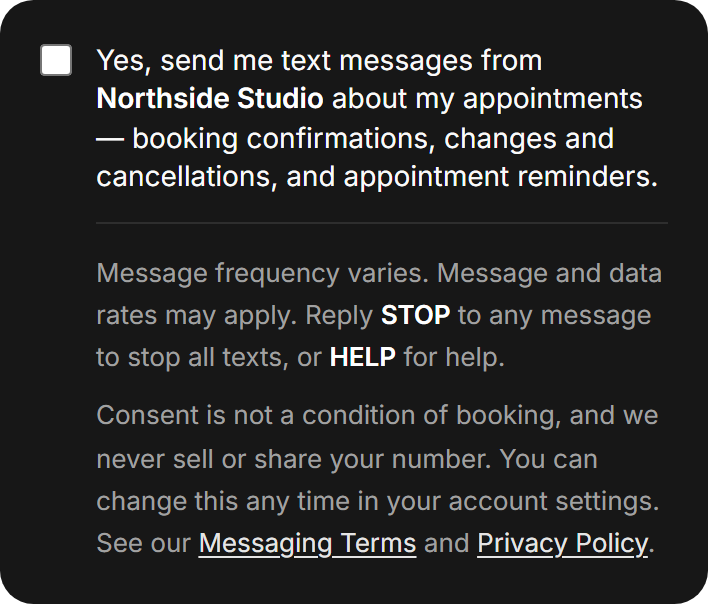
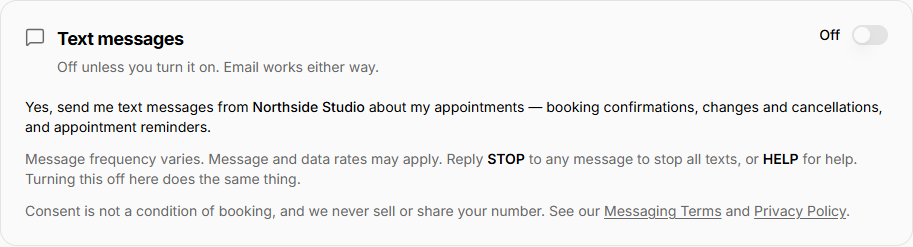
How you opt in. Text messages are off unless you turn them on, and there are exactly two places you can do it — both yours, neither pre-selected. When you create an account there is an unticked box beside a line naming the business and the messages it would send; leaving it alone still creates the account. After that, the setting lives in your account settings and you can turn it on or off whenever you like. Providing a mobile number is never a condition of booking or of buying anything. If you contacted the business by text first, we may reply to you on that number.
If you booked as a guest, we do not text you. Bookings made without an account are confirmed and reminded by email only. Create an account and turn on text messages if you would rather be reminded that way.
Your number is used only for the business you booked with, and consent is recorded with the date and the way it was given.
Getting help. Reply HELP to any appointment message, or email contact@kalendaryo.ai. That is the address the automatic HELP reply gives you.
Frequency. Message frequency depends on how often you book. Expect roughly one to three messages per appointment.
2. Replies to an enquiry you sent a business
Some businesses use our software to answer enquiries that arrive through their contact form, their website chat, or a call they missed. Where that happens, our agent replies on the business's behalf and may follow up if you haven't had an answer.
How you opt in — and when we will not text you. If you started the conversation by calling or texting the business, we may reply to you by text on the number you used. If your phone number simply appeared in a web form, that is not consent to text it: we reply by email instead, unless the form carried a clear, unchecked box asking whether you wanted to be texted. This boundary is enforced in our software, not just stated here.
Frequency. A reply to your enquiry, then at most a small, capped number of follow-ups spread over about a week. Follow-ups stop as soon as you reply, book, or opt out, and are never sent overnight in your local time.
3. Messages from Pasco Labs to our own contacts
If you contact us, sign up for early access, or become a customer, we may send you text messages about your enquiry, your account, or onboarding — but only if you gave us your mobile number and agreed to be texted.
If you run a business on Kalendaryo, this also covers alerts about your own account — chiefly a notice when a new enquiry comes in for you. These are sent from our number, not yours, and they are a separate programme from the appointment messages your business sends its customers.
How you opt in. These alerts are off by default. You turn them on yourself, in your account settings, using a control that names us as the sender and lists what we will send. Agreeing to appointment messages from a business does not opt you in to these, and turning these on does not opt you in to those — they are recorded separately.
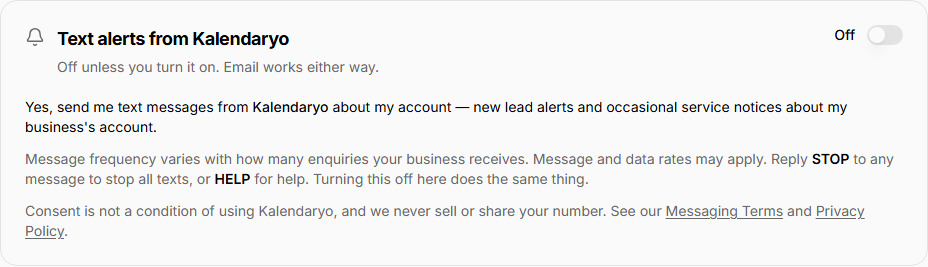
Frequency. Varies with how many enquiries your business receives; typically only in response to something you started. We do not run bulk marketing campaigns.
Cost
We do not charge for text messages. Message and data rates may apply depending on your mobile plan and carrier.
Stopping messages
Reply STOP to any message to end it. You will receive one confirmation that you have been unsubscribed, and then no further messages in that program. You can also email allan@pascolabs.com and ask to be removed.
Opting out of appointment messages does not cancel your appointment. If you stop reminders, you are responsible for remembering the booking.
Reply HELP to any message for support information, or contact us at allan@pascolabs.com or +1 (201) 780-4209.
To start receiving messages again, reply START to the number that messaged you, or turn text messages back on in your account settings.
Carriers
Mobile carriers are not liable for delayed or undelivered messages. Delivery is not guaranteed; messages depend on your device, your plan, and network conditions.
Privacy
No mobile information will be sold or shared with third parties or affiliates for marketing or promotional purposes. Text messaging originator opt-in data and consent will not be shared with any third parties. Numbers are shared with our telecommunications provider only to deliver the messages described above. See our Privacy Policy for the full picture.
Changes
We may update these terms. The effective date at the top of this page reflects the current version.
Questions about this document? Write to allan@pascolabs.com. Postal correspondence for Pasco Labs LLC can be arranged by email — we'll provide a mailing address on request.